java实现两张图片合成一张,图片嵌套,背景图片添加二维码
·
两张图片合成一张
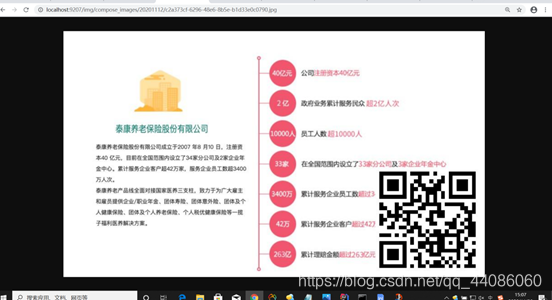
例如:一张二维码,一张背景图,把二维码放在背景图上。
Service层代码
图片保存到
@Service
public class ResumeTemplateServiceImpl extends ServiceImpl<ResumeTemplateMapper, ResumeTemplate> implements IResumeTemplateService {

    private static String ComposeFileNameManual = "compose_images";

    /**
     * 请求 url 中的资源映射,不推荐写死在代码中,最好提供可配置,如 /upload_flowChart/**
     */
    @Value("${uploadFile.resourceHandler}")
    private String resourceHandler;

    /**
     * 上传文件保存的本地目录,使用@Value获取全局配置文件中配置的属性值,如 E:/java/upload_flowChart/
     */
    @Value("${uploadFile.location}")
    private String uploadImagesLocation;


/**
 * 合成图片
 * @param templatePath 模板地址
 * @param seedPath 二维码地址
 * @return种子模板链接
 */
@Override
public String composePic(String templatePath, String seedPath) {

    try {
    //文件名
    String picName = UUID.randomUUID().toString() + ".jpg";
    //日期格式文件夹
    String composeFileName = BatchNumberUtils.getFileNameByDate(ComposeFileNameManual);
    //合成图片文件夹
    File pathFile = new File(uploadImagesLocation + File.separator + composeFileName);
    //合成文件路径
    String path = uploadImagesLocation + File.separator + composeFileName + File.separator + picName;
    //数据库储存地址
    String dataPath = resourceHandler.substring(0, resourceHandler.length() - 2) + composeFileName + "/" + picName;

        if (seedPath == null || StringUtils.isBlank(seedPath)) {
            File file = new File(seedPath);
            if (!file.isFile()) {
                System.out.println("图片源路径不是一个文件");
            }
            System.out.println("图片源路径不存在");
        }
        if (templatePath == null || StringUtils.isBlank(templatePath)) {
            File file = new File(templatePath);
            if (!file.isFile()) {
                System.out.println("背景图片路径不是一个文件");
            }
            System.out.println("背景图片路径不存在");
        }

        if (!pathFile.exists()) {
            pathFile.mkdirs();
        }

//---------------------------------合成图片步骤-----------------------------
        //背景
   		File templateFlie = new File(templatePath);
        BufferedImage bg = ImageIO.read(templateFlie);//读取背景图片
        int height = bg.getHeight();//背景图片的高
        int width = bg.getWidth();  //背景图片的宽

        BufferedImage qcCode = ImageIO.read(new File(seedPath));  //读取二维码图片 300 * 300
        BufferedImage img = new BufferedImage(width, height, BufferedImage.TYPE_INT_RGB);//创建画布
        Graphics g = img.getGraphics();//生成画笔 开启画图

        // 绘制背景图片
        g.drawImage(bg.getScaledInstance(width, height, Image.SCALE_DEFAULT), 0, 0, null); // 绘制缩小后的图
        //绘制二维码图片  定位到背景图的右下角
        g.drawImage(qcCode.getScaledInstance(width / 4, width / 4, Image.SCALE_DEFAULT), width - (width / 4)-10, height - (width / 4)- 10, null); // 绘制缩小后的图
		//关掉画笔
        g.dispose();

        ImageIO.write(img, "jpg", new File(path));

        System.out.println("合成图片成功,路径:" + path);
        //返回合成图片的路径
        return dataPath;
    } catch (Exception E) {
        throw new CustomException("图片合成失败", 400);
    }

}
}
工具类生成带日期的文件夹
public class BatchNumberUtils {

    private static final SimpleDateFormat simpleDateFormat = new SimpleDateFormat("yyyyMMddHHmmss");
    private static final SimpleDateFormat dateFormat = new SimpleDateFormat("yyyyMMdd");
    private static final AtomicInteger atomicInteger = new AtomicInteger(1000000);

    /**
     * 创建不连续的订单号
     *
     * @param no 数据中心编号
     * @return 唯一的、不连续订单号
     */
    public static synchronized String getOrderNoByUUID(String no) {
        Integer uuidHashCode = UUID.randomUUID().toString().hashCode();
        if (uuidHashCode < 0) {
            uuidHashCode = uuidHashCode * (-1);
        }
        String date = simpleDateFormat.format(new Date());
        return no + date + uuidHashCode;
    }

    /**
     * 获取同一秒钟 生成的订单号连续
     *
     * @param no 数据中心编号
     * @return 同一秒内订单连续的编号
     */
    public static synchronized String getOrderNoByAtomic(String no) {
        atomicInteger.getAndIncrement();
        int i = atomicInteger.get();
        String date = simpleDateFormat.format(new Date());
        return no + date + i;
    }

    /**
     * 获取当前日期组成的文件名
     * @param name 文件名前缀
     * @return 组成的文件名
     */
    public static synchronized String getFileNameByDate(String name) {
        String date = dateFormat.format(new Date());
        return name +"/"+ date;
    }

}
编写一个虚拟映射器
虚拟映射相当于一个中转站, 从数据库里拿到相对路径映射器给映射到磁盘上,从而达到图片的访问
@Configuration
public class WebMvcConfig implements WebMvcConfigurer {


   @Value("${uploadFile.resourceHandler}")
   private String resourceHandler;

   @Value("${uploadFile.location}")
   private String location;


   /**
    * 虚拟映射
    */
   @Override
   public void addResourceHandlers(ResourceHandlerRegistry registry) {

      // 就是说 url (http://localhost:8080/flow/upload_flowChart/xxxxxxx.jpg)
      //中出现 resourceHandler 匹配时,则映射到 location 中去,location 相当于虚拟的,被映射的路径
      // 映射本地文件时,开头必须是 file:/// 开头,表示协议
      registry.addResourceHandler(resourceHandler).addResourceLocations("file:///" + location);

   }

}
** Bootstrap.yml文件**
虚拟映射器设置图片保存路径
###上传文件配置 :该配置可根据部署的系统或开发人员自定义路径,每次部署之前需要修改location
uploadFile:
  resourceHandler: /img/**   #请求 url 中的资源映射也是保存到数据库中的父级路径

  location: D:\\resume\\file\\ #自定义上传文件服务器硬盘保存路径  ,linux服务器保存路径 /opt/java/resume/images
合成图片保存地址
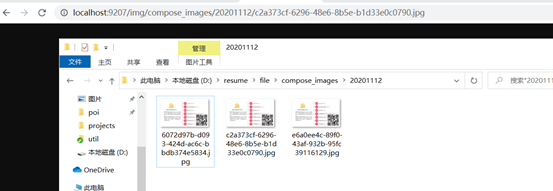
数据库存的路径

通过服务器访问生成的图片

2万人民币佣金等你来拿,中德社区发起者X.Lab,联合德国优秀企业对接开发项目,领取项目得佣金!!!
更多推荐



 0
0 0
0- 0


 已为社区贡献1条内容

所有评论(0)