Kubernetes入门:09.Kubernetes Building Blocks-ReplicaSet
【翻译】
ReplicaSet,是下一代的Replication Controller,因为它实现了Replication controller的复制和自愈能力。ReplicaSet同时支持“基于等式”和“基于集合”的selector,而Replication Controller只支持“基于等式”的selector。
当一个单实例应用在运行时,总是会有应用程序不幸崩溃的风险,或者运行这个应用实例的server出现崩溃的风险。如果只依赖这样的单应用实例,如此这般的crash将会对其他应用、服务、用户带来负面影响。为了避免这样可能出现的故障,我们可以并行运行多个应用实例,以此来获得高可用性。由Pod所定义的应用程序的生命周期将会被ReplicaSet这个控制器进行监督。在ReplicaSet的帮助下,我们可以对运行了特定应用程序容器镜像的Pod进行数量上的横向扩展。横向扩展(Scaling)可以被手动完成,也可以通过使用“autoscaler”来完成。
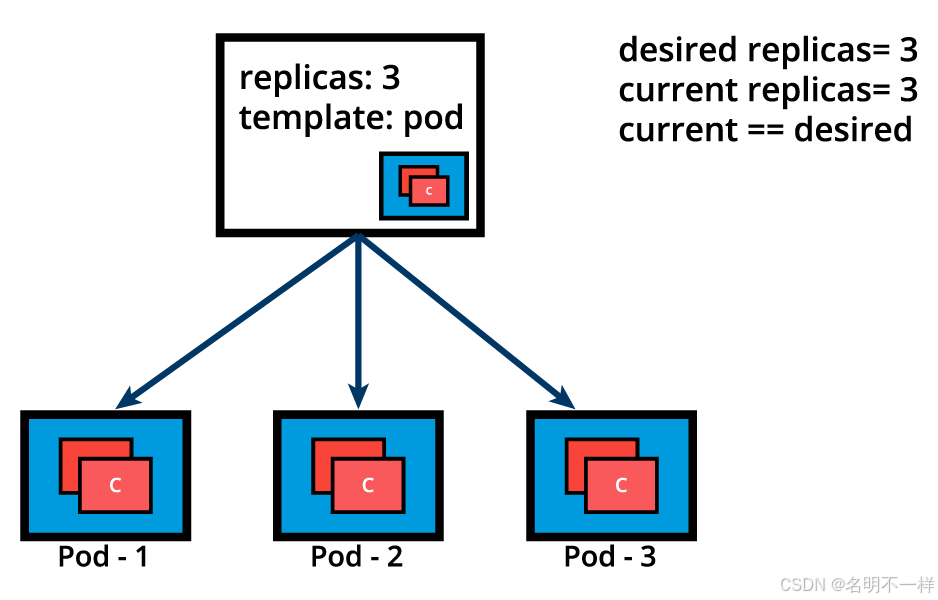
下面我们用图形展示了一个ReplicaSet,它为一个特定的Pod模板设定了副本数量为3.Pod-1,Pod-2,Pod-3是完全一样的,它们运行了相同的应用程序容器镜像,是从同一个Pod模板克隆而成。当前,实际运行状态与期望状态所匹配(都是3个副本)。请记住,虽然我们说这三个副本是一样的--它们运行着相同的应用程序实例,相同的配置文件,但它们拥有独一无二的Pod_name和IP地址,因此不完全一样。Pod对象确保了应用程序可以被各自地防止在集群中任何一个工作节点上,这正是调度(Scheduling)过程的结果。
下面是一个ReplicaSet对象的定义清单示例,用YAML形式编写,它表示了用声明的方式定义一个对象,如果由需要,还可以作为更复杂ReplicaSet定义清单的模板。
apiVersion: apps/v1
kind: ReplicaSet
metadata:
name: frontend
labels:
app: guestbook
tier: frontend
spec:
replicas: 3
selector:
matchLabels:
app: guestbook
template:
metadata:
labels:
app: guestbook
spec:
containers:
- name: php-redis
image: gcr.io/google_samples/gb-frontend:v3
上面的定义清单,假设存储为redis-rs.yaml文件,会被load进集群然后运行一组3个Pod副本和它们所关联的容器镜像。下面命令所用到的"create"是一个例子,对于高阶的kubernetes实践者可能倾向于使用apply来进行替代。
Kubecrl create -f redis-rs.yaml
在我们进入到更复杂的应用部署和管理之前,请熟悉下面的ReplicaSet操作,比如
$ kubectl apply -f redis-rs.yaml
$ kubectl get replicasets
$ kubectl get rs
$ kubectl scale rs frontend --replicas=4
$ kubectl get rs frontend -o yaml
$ kubectl get rs frontend -o json
$ kubectl describe rs frontend
$ kubectl delete rs frontend
让我们继续来研究这个ReplicaSet的例子,现在我们假设其中一个Pod被计划外强制终止(可能是因为资源不足、超时、托管主机崩溃等等),导致当前实际运行状态不再与期望状态一致。
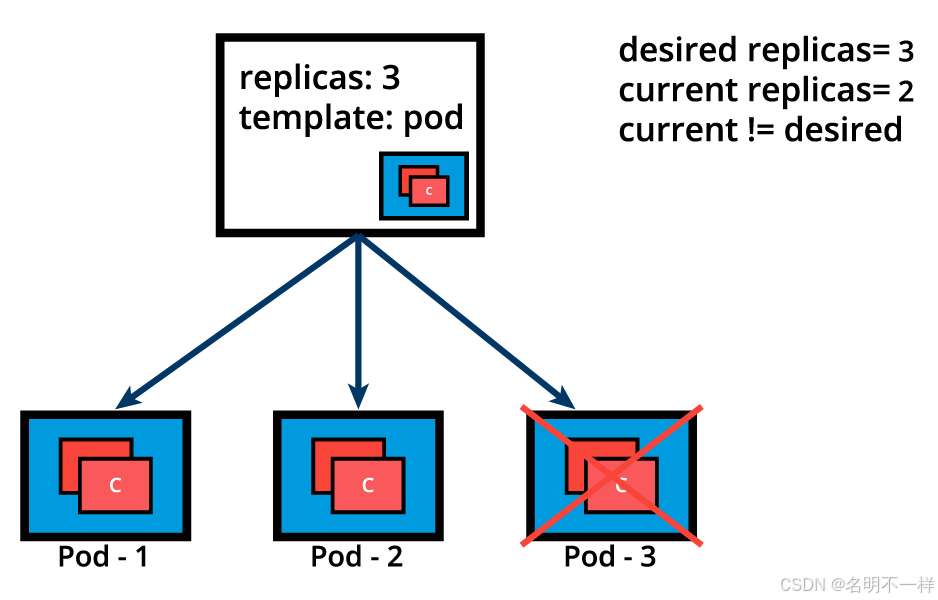
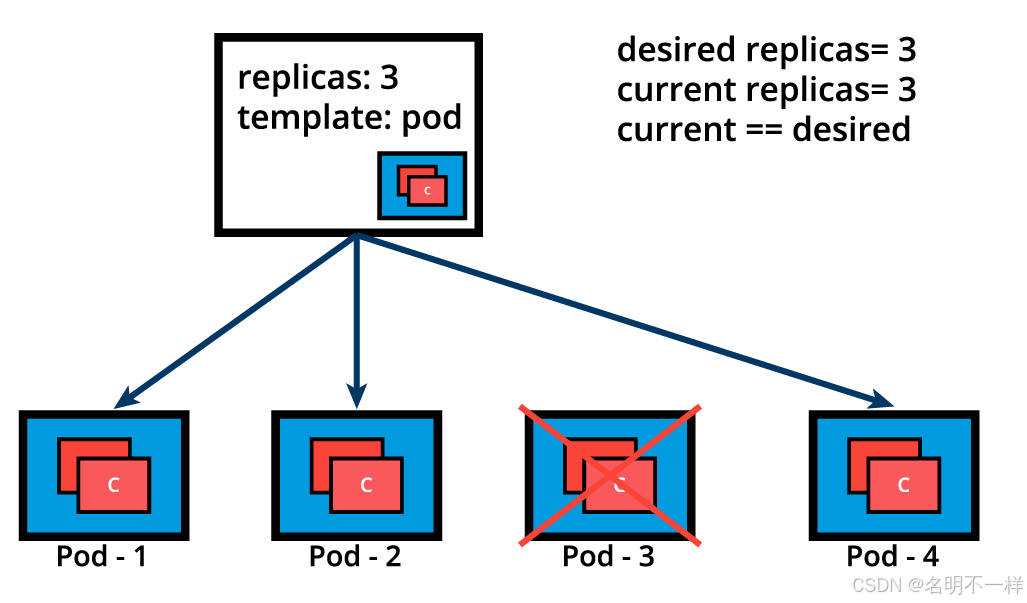
ReplicaSet检测到当前状态已经不再符合期望状态,于是触发一个请求用于创建一个额外的Pod,因此来确保当前实际状态与期望状态一致。
ReplicaSet可以作为Pod控制器来独自使用,不过它只提供了有限的一些特性。其他与之互补的特性将由Deployment来提供,它是用来编排Pod的推荐的控制器(controller)。Deployment管理着Pod的创建、删除、更新。Deployment会自动创建一个ReplicaSet,然后创建一个Pod。所有就没有必要分开来管理ReplicaSet和Pods了,Deployment将会代表我们管理这两个对象。我们将会进一步探索Deployment。
【原文】
A ReplicaSet is, in part, the next-generation ReplicationController, as it implements the replication and self-healing aspects of the ReplicationController. ReplicaSets support both equality- and set-based Selectors, whereas ReplicationControllers only support equality-based Selectors.
When a single instance of an application is running there is always the risk of the application instance crashing unexpectedly, or the entire server hosting the application crashing. If relying only on a single application instance, such a crash could adversely impact other applications, services, or clients. To avoid such possible failures, we can run in parallel multiple instances of the application, hence achieving high availability. The lifecycle of the application defined by a Pod will be overseen by a controller - the ReplicaSet. With the help of the ReplicaSet, we can scale the number of Pods running a specific application container image. Scaling can be accomplished manually or through the use of an autoscaler.
Below we graphically represent a ReplicaSet, with the replica count set to 3 for a specific Pod template. Pod-1, Pod-2, and Pod-3 are identical, running the same application container image, being cloned from the same Pod template. For now, the current state matches the desired state. Keep in mind, however, that although the three Pod replicas are said to be identical - running an instance of the same application, same configuration, they are still distinct through unique Pod name and IP address. The Pod object ensures that the application can be individually placed on any worker node of the cluster as a result of the scheduling process.
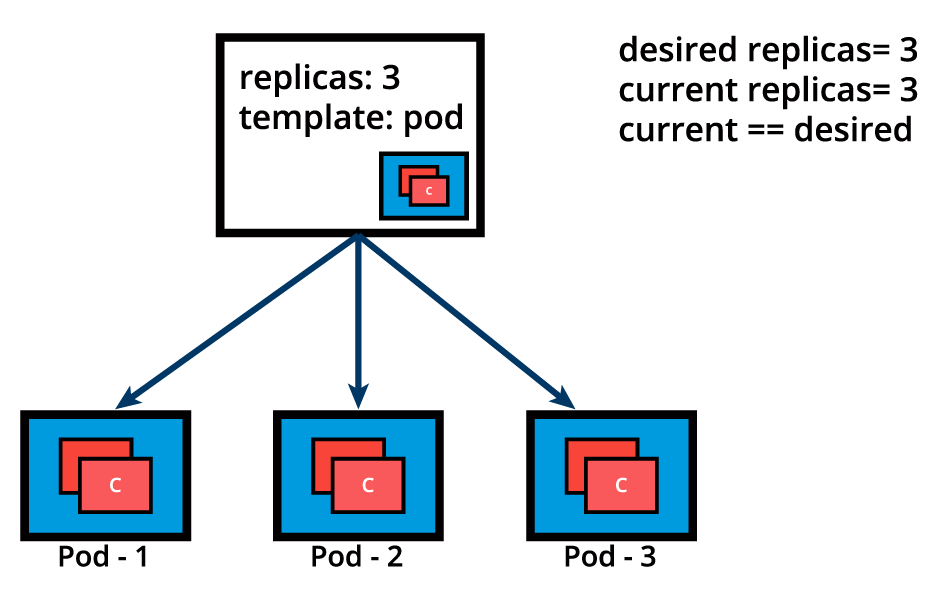
ReplicaSet (Current State Matches the Desired State)
Below is an example of a ReplicaSet object's definition manifest in YAML format. This represents the declarative method to define an object, and can serve as a template for a much more complex ReplicaSet definition manifest if desired:
apiVersion: apps/v1
kind: ReplicaSet
metadata:
name: frontend
labels:
app: guestbook
tier: frontend
spec:
replicas: 3
selector:
matchLabels:
app: guestbook
template:
metadata:
labels:
app: guestbook
spec:
containers:
- name: php-redis
image: gcr.io/google_samples/gb-frontend:v3
The above definition manifest, if stored by a redis-rs.yaml file, is loaded into the cluster to run a set of three identical Pod replicas and their associated container image. While create is exemplified below, advanced Kubernetes practitioners may opt to use apply instead:
$ kubectl create -f redis-rs.yaml
Before advancing to more complex application deployment and management methods, become familiar with ReplicaSet operations with additional commands such as:
$ kubectl apply -f redis-rs.yaml
$ kubectl get replicasets
$ kubectl get rs
$ kubectl scale rs frontend --replicas=4
$ kubectl get rs frontend -o yaml
$ kubectl get rs frontend -o json
$ kubectl describe rs frontend
$ kubectl delete rs frontend
Let's continue with the same ReplicaSet example and assume that one of the Pods is forced to unexpectedly terminate (due to insufficient resources, timeout, its hosting node has crashed, etc.), causing the current state to no longer match the desired state.
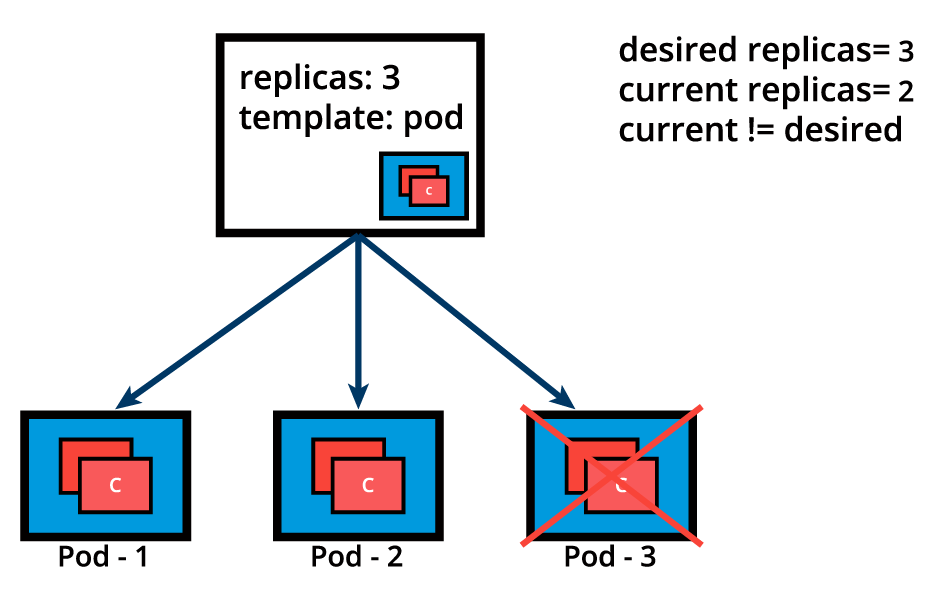
ReplicaSet (Current State and Desired State Are Different)
The ReplicaSet detects that the current state is no longer matching the desired state and triggers a request for an additional Pod to be created, thus ensuring that the current state matches the desired state.
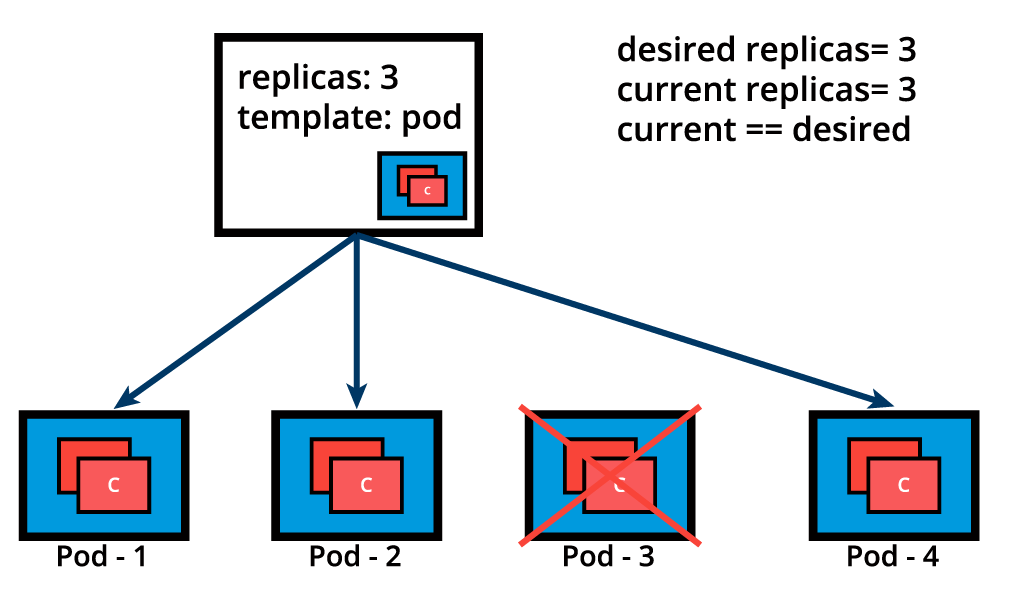
ReplicaSet (Creating a Pod to Match Current State with Desired State)
ReplicaSets can be used independently as Pod controllers but they only offer a limited set of features. A set of complementary features are provided by Deployments, the recommended controllers for the orchestration of Pods. Deployments manage the creation, deletion, and updates of Pods. A Deployment automatically creates a ReplicaSet, which then creates a Pod. There is no need to manage ReplicaSets and Pods separately, the Deployment will manage them on our behalf.

2万人民币佣金等你来拿,中德社区发起者X.Lab,联合德国优秀企业对接开发项目,领取项目得佣金!!!
更多推荐


 0
0 0
0- 0


 已为社区贡献1条内容

所有评论(0)