软件测试——Mockito教程
摘要
Mock通常是指,在测试一个对象A时,我们构造一些假的对象来模拟与A之间的交互,而这些Mock对象的行为是我们事先设定且符合预期。通过这些Mock对象来测试A在正常逻辑,异常逻辑或压力情况下工作是否正常。而Mockito是最流行的Java mock框架之一。
1. Mock 测试
Mock通常是指,在测试一个对象A时,我们构造一些假的对象来模拟与A之间的交互,而这些Mock对象的行为是我们事先设定且符合预期。通过这些Mock对象来测试A在正常逻辑,异常逻辑或压力情况下工作是否正常。
Mock 测试就是在测试过程中,对于某些不容易构造(如 HttpServletRequest 必须在Servlet 容器中才能构造出来)或者不容易获取比较复杂的对象(如 JDBC 中的ResultSet 对象),用一个虚拟的对象(Mock 对象)来创建以便测试的测试方法。Mock 最大的功能是帮你把单元测试的耦合分解开,如果你的代码对另一个类或者接口有依赖,它能够帮你模拟这些依赖,并帮你验证所调用的依赖的行为。
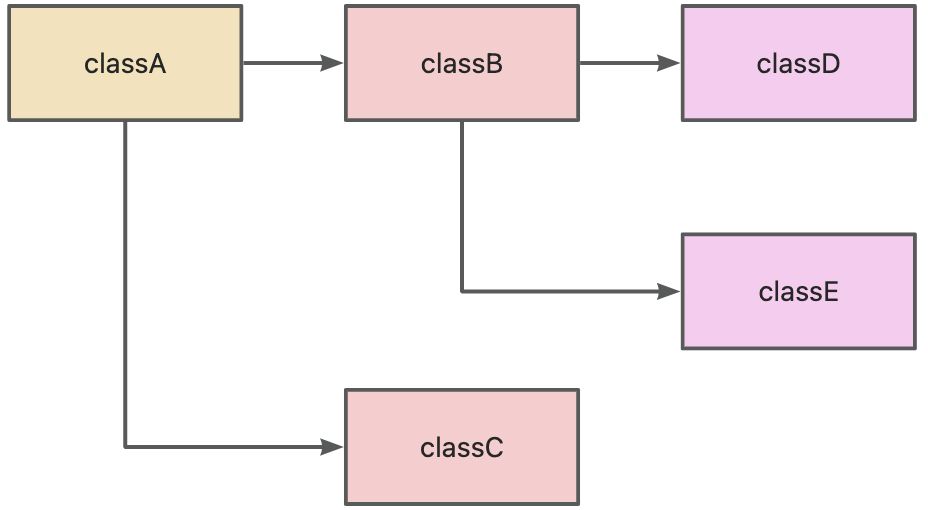
从上图可以看出如果我们要对A进行测试,那么就要先把整个依赖树构建出来,也就是BCDE的实例。一种替代方案就是使用mocks。
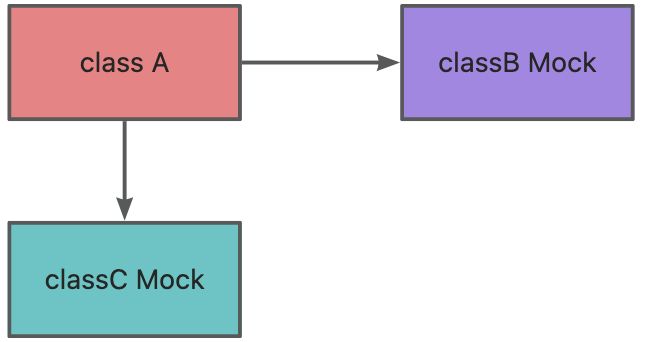
从图中可以清晰的看出, mock对象就是在调试期间用来作为真实对象的替代品。mock测试就是在测试过程中,对那些不容易构建的对象用一个虚拟对象来代替测试的方法就叫mock测试。
2. Mock 适用在什么场景
在使用Mock的过程中,发现Mock是有一些通用性的,对于一些应用场景,是非常适合使用Mock的:
- 真实对象具有不可确定的行为(产生不可预测的结果,如股票的行情)
- 真实对象很难被创建(比如具体的web容器)
- 真实对象的某些行为很难触发(比如网络错误)
- 真实情况令程序的运行速度很慢
- 真实对象有用户界面
- 测试需要询问真实对象它是如何被调用的(比如测试可能需要验证某个回调函数是否被调用了)
- 真实对象实际上并不存在(当需要和其他开发小组,或者新的硬件系统打交道的时候,这是一个普遍的问题)
当然,也有一些不得不Mock的场景:
- 一些比较难构造的Object:这类Object通常有很多依赖,在单元测试中构造出这样类通常花费的成本太大。
- 执行操作的时间较长Object:有一些Object的操作费时,而被测对象依赖于这一个操作的执行结果,例如大文件写操作,数据的更新等等,出于测试的需求,通常将这类操作进行Mock。
- 异常逻辑:一些异常的逻辑往往在正常测试中是很难触发的,通过Mock可以人为的控制触发异常逻辑。
在一些压力测试的场景下,也不得不使用Mock,例如在分布式系统测试中,通常需要测试一些单点(如namenode,jobtracker)在压力场景下的工作是否正常。而通常测试集群在正常逻辑下无法提供足够的压力(主要原因是受限于机器数量),这时候就需要应用Mock去满足。
3. Maven包引入
<dependencies>
  <dependency>
    <groupId>junit</groupId>
    <artifactId>junit</artifactId>
    <version>4.12</version>
    <scope>test</scope>
  </dependency>
  <!-- https://mvnrepository.com/artifact/org.mockito/mockito-core -->
  <dependency>
    <groupId>org.mockito</groupId>
    <artifactId>mockito-core</artifactId>
    <version>3.7.7</version>
    <scope>test</scope>
  </dependency>
</dependencies>
4. mock一个普通类
待测试类DemoService
import tech.pdai.mockito.dao.DemoDao;

public class DemoService {

    private DemoDao demoDao;

    public DemoService(DemoDao demoDao) {
        this.demoDao = demoDao;
    }

    public int getDemoStatus(){
        return demoDao.getDemoStatus();
    }
}
依赖DemoDao
import java.util.Random;

public class DemoDao {

    public int getDemoStatus(){
        return new Random().nextInt();
    }
}
service---》 dao
测试类
- mock 对象
- 打桩
- 断言
import org.junit.Assert;
import org.junit.Test;
import org.mockito.Mockito;
import tech.pdai.mockito.dao.DemoDao;
import tech.pdai.mockito.service.DemoService;

/**
 * Hello World Test.
 */
public class HelloWorldTest {

    @Test
    public void helloWorldTest() {
        // mock 一个对象 一个dao的对象
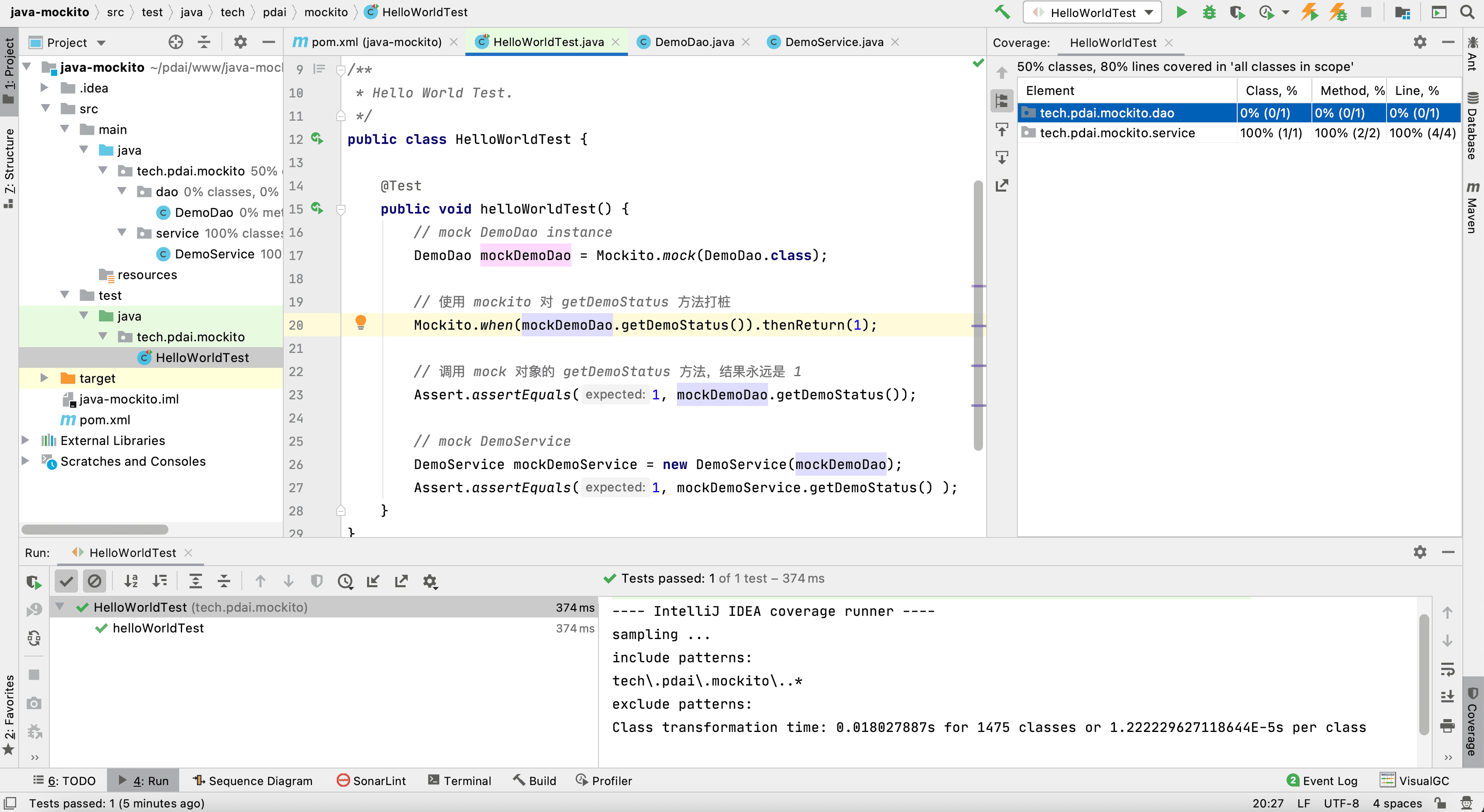
        DemoDao mockDemoDao = Mockito.mock(DemoDao.class);

        // 使用 mockito 对 getDemoStatus 方法打桩
        Mockito.when(mockDemoDao.getDemoStatus()).thenReturn(1);

        // 调用 mock 对象的 getDemoStatus 方法,结果永远是 1
        Assert.assertEquals(1, mockDemoDao.getDemoStatus());

        // mock DemoService
        DemoService mockDemoService = new DemoService(mockDemoDao);
        Assert.assertEquals(1, mockDemoService.getDemoStatus() );
    }
}
5. mock接口类
import org.junit.Assert;
import org.junit.Test;

import java.util.List;
import java.util.Random;

import static org.mockito.Mockito.mock;
import static org.mockito.Mockito.when;

/**
 * Mock Class Test.
 */
public class MockClassTest {

    @Test
    public void mockClassTest() {
        //  mock  接口对象
        Random mockRandom = mock(Random.class);

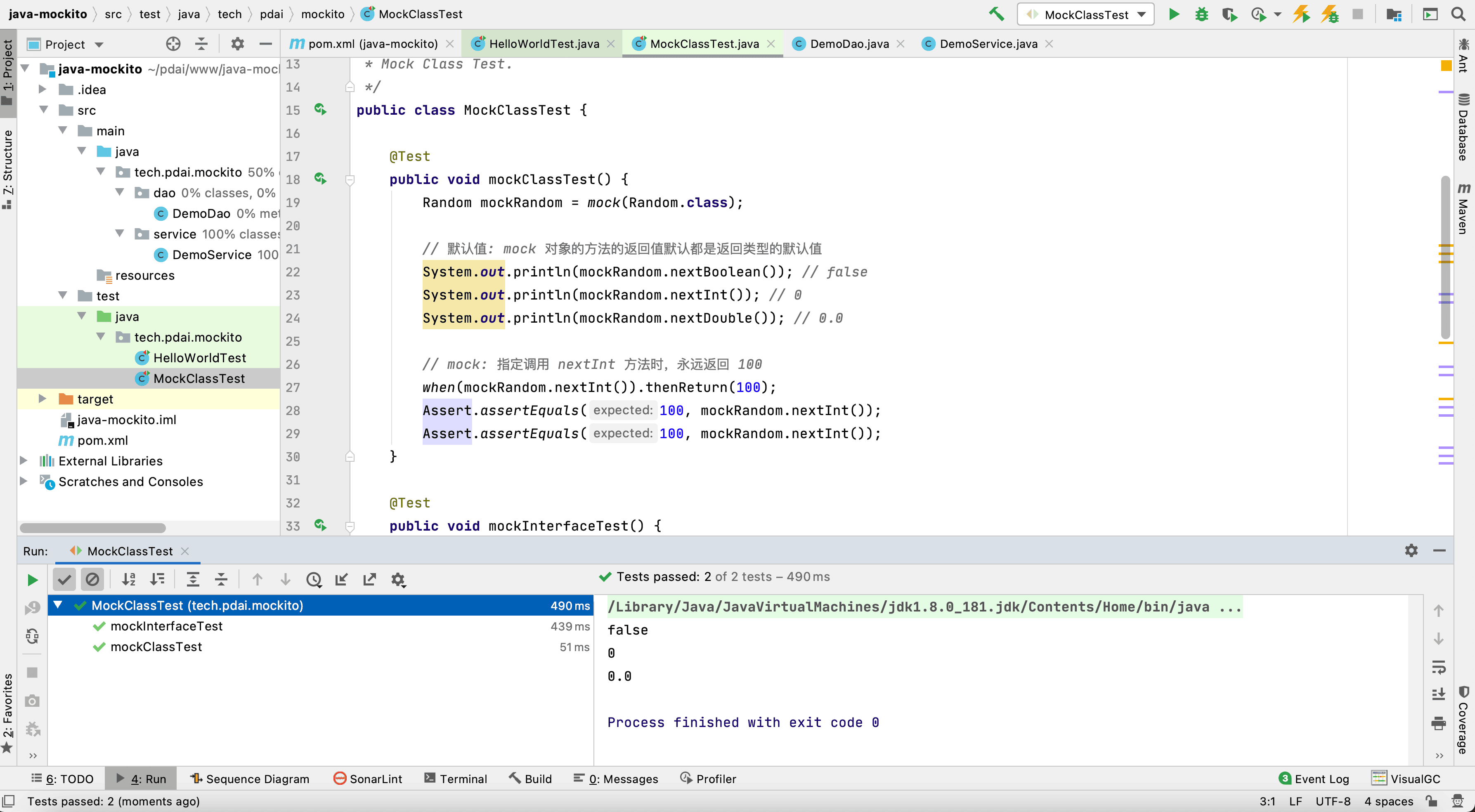
        // 默认值: mock 对象的方法的返回值默认都是返回类型的默认值
        System.out.println(mockRandom.nextBoolean()); // false
        System.out.println(mockRandom.nextInt()); // 0
        System.out.println(mockRandom.nextDouble()); // 0.0

        // mock: 指定调用 nextInt 方法时,永远返回 100
        when(mockRandom.nextInt()).thenReturn(100);
        Assert.assertEquals(100, mockRandom.nextInt());
    }

    @Test
    public void mockInterfaceTest() {
        // mock 接口
        List mockList = mock(List.class);

        // 接口的默认值:和类方法一致,都是默认返回值
        Assert.assertEquals(0, mockList.size());
        Assert.assertEquals(null, mockList.get(0));

        // 注意:调用 mock 对象的写方法,是没有效果的
        mockList.add("a");
        Assert.assertEquals(0, mockList.size());      // 没有指定 size() 方法返回值,这里结果是默认值
        Assert.assertEquals(null, mockList.get(0));   // 没有指定 get(0) 返回值,这里结果是默认值

        // mock值测试
        when(mockList.get(0)).thenReturn("a");          // 指定 get(0)时返回 a
        Assert.assertEquals(0, mockList.size());        // 没有指定 size() 方法返回值,这里结果是默认值
        Assert.assertEquals("a", mockList.get(0));      // 因为上面指定了 get(0) 返回 a,所以这里会返回 a
        Assert.assertEquals(null, mockList.get(1));     // 没有指定 get(1) 返回值,这里结果是默认值
    }
}
6. @Mock+@RunWith(MockitoJUnitRunner.class)注解
使用该注解时,要使用MockitoAnnotations.initMocks 方法,让注解生效, 比如放在@Before方法中初始化。
比较优雅优雅的写法是用MockitoJUnitRunner,它可以自动执行MockitoAnnotations.initMocks 方法。
import org.junit.Assert;
import org.junit.Test;
import org.junit.runner.RunWith;
import org.mockito.Mock;
import org.mockito.junit.MockitoJUnitRunner;

import java.util.Random;

import static org.mockito.Mockito.when;

/**
 * Mock Annotation
 */
@RunWith(MockitoJUnitRunner.class)
public class MockAnnotationTest {

    // mock 一个接口
    @Mock
    private Random random;

    @Test
    public void test() {
        when(random.nextInt()).thenReturn(100);
        Assert.assertEquals(100, random.nextInt());
    }
}
anyInt 只是用来匹配参数的工具之一,目前 mockito 有多种匹配函数,部分如下:
|
函数名 |
匹配类型 |
|
any() |
所有对象类型 |
|
anyInt() |
基本类型 int、非 null 的 Integer 类型 |
|
anyChar() |
基本类型 char、非 null 的 Character 类型 |
|
anyShort() |
基本类型 short、非 null 的 Short 类型 |
|
anyBoolean() |
基本类型 boolean、非 null 的 Boolean 类型 |
|
anyDouble() |
基本类型 double、非 null 的 Double 类型 |
|
anyFloat() |
基本类型 float、非 null 的 Float 类型 |
|
anyLong() |
基本类型 long、非 null 的 Long 类型 |
|
anyByte() |
基本类型 byte、非 null 的 Byte 类型 |
|
anyString() |
String 类型(不能是 null) |
|
anyList() |
List<T> 类型(不能是 null) |
|
anyMap() |
Map<K, V>类型(不能是 null) |
|
anyCollection() |
Collection<T>类型(不能是 null) |
|
anySet() |
Set<T>类型(不能是 null) |
|
any(Class<T> type) |
type类型的对象(不能是 null) |
|
isNull() |
null |
|
notNull() |
非 null |
|
isNotNull() |
非 null |
7. Mock异常类
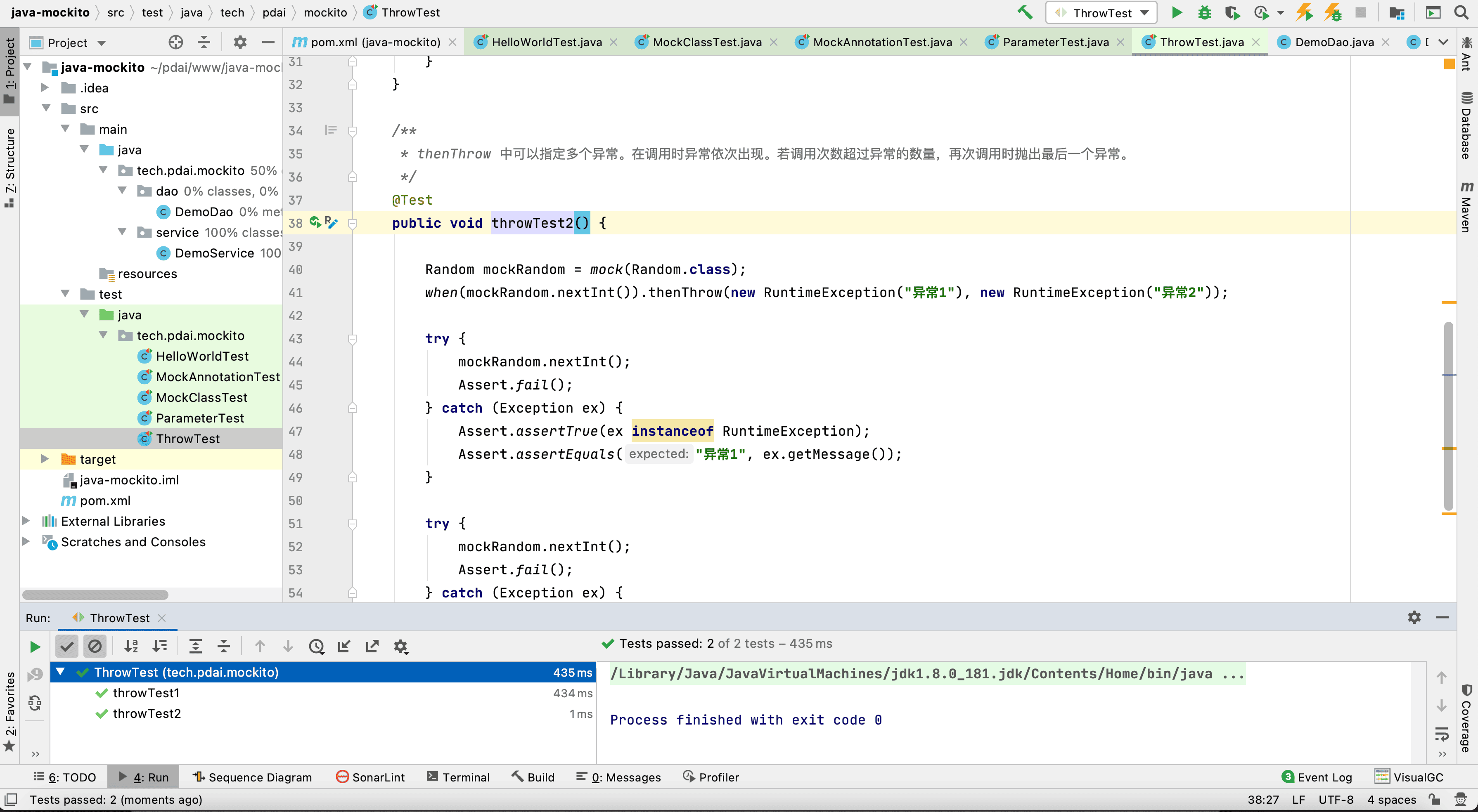
Mockito 使用 thenThrow 让方法抛出异常
import org.junit.Assert;
import org.junit.Test;

import java.util.Random;

import static org.mockito.Mockito.mock;
import static org.mockito.Mockito.when;

/**
 * Exception Test.
 */
public class ThrowTest {

    /**
     * 例子1: thenThrow 用来让函数调用抛出异常.
     */
    @Test
    public void throwTest1() {

        Random mockRandom = mock(Random.class);
        when(mockRandom.nextInt()).thenThrow(new RuntimeException("异常"));

        try {
            mockRandom.nextInt();
            Assert.fail();  // 上面会抛出异常,所以不会走到这里
        } catch (Exception ex) {
            Assert.assertTrue(ex instanceof RuntimeException);
            Assert.assertEquals("异常", ex.getMessage());
        }
    }

    /**
     * thenThrow 中可以指定多个异常。在调用时异常依次出现。若调用次数超过异常的数量,再次调用时抛出最后一个异常。
     */
    @Test
    public void throwTest2() {

        Random mockRandom = mock(Random.class);
        when(mockRandom.nextInt()).thenThrow(new RuntimeException("异常1"), new RuntimeException("异常2"));

        try {
            mockRandom.nextInt();
            Assert.fail();
        } catch (Exception ex) {
            Assert.assertTrue(ex instanceof RuntimeException);
            Assert.assertEquals("异常1", ex.getMessage());
        }

        try {
            mockRandom.nextInt();
            Assert.fail();
        } catch (Exception ex) {
            Assert.assertTrue(ex instanceof RuntimeException);
            Assert.assertEquals("异常2", ex.getMessage());
        }
    }
}
对应返回类型是 void 的函数,thenThrow 是无效的,要使用 doThrow。
import org.junit.Assert;
import org.junit.Test;
import org.junit.runner.RunWith;
import org.mockito.Mock;
import org.mockito.MockitoAnnotations;
import org.mockito.junit.MockitoJUnitRunner;

import static org.mockito.Mockito.doThrow;

/**
 * Do Throw for void return.
 */
@RunWith(MockitoJUnitRunner.class)
public class DoThrowTest {

    static class ExampleService {

        public void hello() {
            System.out.println("Hello");
        }

    }

    @Mock
    private ExampleService exampleService;

    @Test
    public void test() {

        // 这种写法可以达到效果
        doThrow(new RuntimeException("异常")).when(exampleService).hello();

        try {
            exampleService.hello();
            Assert.fail();
        } catch (RuntimeException ex) {
            Assert.assertEquals("异常", ex.getMessage());
        }

    }
}
8. spy 和 @Spy 注解
spy 和 mock不同,不同点是:
- spy 的参数是对象示例,mock 的参数是 class。
- 被 spy 的对象,调用其方法时默认会走真实方法。mock 对象不会。
import org.junit.Assert;
import org.junit.Test;
import static org.mockito.Mockito.*;


class ExampleService {

    int add(int a, int b) {
        return a+b;
    }

}

public class MockitoDemo {

    // 测试 spy
    @Test
    public void test_spy() {

        ExampleService spyExampleService = spy(new ExampleService());

        // 默认会走真实方法
        Assert.assertEquals(3, spyExampleService.add(1, 2));

        // 打桩后,不会走了
        when(spyExampleService.add(1, 2)).thenReturn(10);
        Assert.assertEquals(10, spyExampleService.add(1, 2));

        // 但是参数比匹配的调用,依然走真实方法
        Assert.assertEquals(3, spyExampleService.add(2, 1));

    }

    // 测试 mock
    @Test
    public void test_mock() {

        ExampleService mockExampleService = mock(ExampleService.class);

        // 默认返回结果是返回类型int的默认值
        Assert.assertEquals(0, mockExampleService.add(1, 2));

    }

}
spy 对应注解 @Spy,和 @Mock 是一样用的。
import org.junit.Assert;
import org.junit.Test;
import org.mockito.MockitoAnnotations;
import org.mockito.Spy;

import static org.mockito.Mockito.*;


class ExampleService {

    int add(int a, int b) {
        return a+b;
    }

}

public class MockitoDemo {

    @Spy
    private ExampleService spyExampleService;

    @Test
    public void test_spy() {

        MockitoAnnotations.initMocks(this);

        Assert.assertEquals(3, spyExampleService.add(1, 2));

        when(spyExampleService.add(1, 2)).thenReturn(10);
        Assert.assertEquals(10, spyExampleService.add(1, 2));

    }

}
对于@Spy,如果发现修饰的变量是 null,会自动调用类的无参构造函数来初始化。
// 写法1
@Spy
private ExampleService spyExampleService;

// 写法2
@Spy
private ExampleService spyExampleService = new ExampleService();
如果没有无参构造函数,必须使用写法2。例子:
import org.junit.Assert;
import org.junit.Test;
import org.mockito.MockitoAnnotations;
import org.mockito.Spy;

class ExampleService {

    private int a;

    public ExampleService(int a) {
        this.a = a;
    }

    int add(int b) {
        return a+b;
    }

}

public class MockitoDemo {

    @Spy
    private ExampleService spyExampleService = new ExampleService(1);

    @Test
    public void test_spy() {

        MockitoAnnotations.initMocks(this);

        Assert.assertEquals(3, spyExampleService.add(2));

    }

}
9. PowerMock支持静态方法
PowerMock 是一个增强库,用来增加 Mockito 、EasyMock 等测试库的功能。Mockito为什么不能mock静态方法?
因为Mockito使用继承的方式实现mock的,用CGLIB生成mock对象代替真实的对象进行执行,为了mock实例的方法,你可以在subclass中覆盖它,而static方法是不能被子类覆盖的,所以Mockito不能mock静态方法。
但PowerMock可以mock静态方法,因为它直接在bytecode上工作。
9.1. Mockito 默认是不支持静态方法
public class ExampleService {
    // 这是一个静态方法
    public static int add(int a, int b) {
        return a+b;
    }

}
尝试给静态方法打桩,会报错:
import org.junit.Test;
import org.junit.runner.RunWith;
import org.mockito.Mock;
import org.mockito.junit.MockitoJUnitRunner;

import static org.mockito.Mockito.*;

@RunWith(MockitoJUnitRunner.class)
public class MockitoDemo {

    @Test
    public void test() {

        // 会报错
        when(ExampleService.add(1, 2)).thenReturn(100);

    }

}
- 可以用 Powermock 弥补 Mockito 缺失的静态方法 mock 功能
9.2. Powermock的依赖
<properties>
  <powermock.version>2.0.2</powermock.version>
</properties>
<dependencies>
  <dependency>
    <groupId>org.powermock</groupId>
    <artifactId>powermock-module-junit4</artifactId>
    <version>${powermock.version}</version>
    <scope>test</scope>
  </dependency>
  <dependency>
    <groupId>org.powermock</groupId>
    <artifactId>powermock-api-mockito2</artifactId>
    <version>${powermock.version}</version>
    <scope>test</scope>
  </dependency>
</dependencies>
import org.junit.Assert;
import org.junit.Test;
import org.junit.runner.RunWith;
import org.powermock.api.mockito.PowerMockito;
import org.powermock.core.classloader.annotations.PrepareForTest;
import org.powermock.modules.junit4.PowerMockRunner;

import static org.mockito.Mockito.*;

@RunWith(PowerMockRunner.class)     // 这是必须的
@PrepareForTest(ExampleService.class)  // 声明要处理 ExampleService
public class MockitoDemo {
    @Test
    public void test() {
        // mock  静态方法
        PowerMockito.mockStatic(ExampleService.class);  // 这也是必须的

        when(ExampleService.add(1, 2)).thenReturn(100);

        Assert.assertEquals(100, ExampleService.add(1, 2));
        Assert.assertEquals(0, ExampleService.add(2, 2));
    }
}
9.3. PowerMockRunner 支持 Mockito 的 @Mock 等注解
上面我们用了 PowerMockRunner ,MockitoJUnitRunner 就不能用了。但不要担心, @Mock 等注解还能用。
import org.junit.Assert;
import org.junit.Test;
import org.junit.runner.RunWith;
import org.mockito.Mock;
import org.powermock.modules.junit4.PowerMockRunner;

import java.util.Random;

import static org.mockito.Mockito.*;

@RunWith(PowerMockRunner.class)
public class MockitoDemo {

    @Mock
    private Random random;

    @Test
    public void test() {

        when(random.nextInt()).thenReturn(1);
        Assert.assertEquals(1,  random.nextInt());

    }
}
10. Mock私有方法测试
在使用 Mockito 测试私有方法时,你需要结合 PowerMockito,因为 Mockito 本身不支持直接操作私有方法。以下是一个使用 Mockito 和 PowerMockito 测试私有方法的例子:
10.1. PowerMockito 和 Mockito 的依赖项
<dependency>
  <groupId>org.mockito</groupId>
  <artifactId>mockito-core</artifactId>
  <version>4.3.1</version>
  <scope>test</scope>
</dependency>
<dependency>
  <groupId>org.powermock</groupId>
  <artifactId>powermock-module-junit4</artifactId>
  <version>2.0.9</version>
  <scope>test</scope>
</dependency>
<dependency>
  <groupId>org.powermock</groupId>
  <artifactId>powermock-api-mockito2</artifactId>
  <version>2.0.9</version>
  <scope>test</scope>
</dependency>
10.2. 测试私有方法
public class MyClass {
    private String privateMethod(String input) {
        return "Processed " + input;
    }
}
你可以使用以下代码来测试这个私有方法:
import static org.junit.jupiter.api.Assertions.assertEquals;
import static org.powermock.api.mockito.PowerMockito.spy;
import static org.powermock.api.mockito.PowerMockito.when;
import static org.powermock.reflect.Whitebox.invokeMethod;

import org.junit.jupiter.api.Test;
import org.junit.runner.RunWith;
import org.powermock.core.classloader.annotations.PrepareForTest;
import org.powermock.modules.junit4.PowerMockRunner;

@RunWith(PowerMockRunner.class)
@PrepareForTest(MyClass.class)
public class MyClassTest {
    @Test
    public void testPrivateMethod() throws Exception {
        MyClass myClass = new MyClass();
        MyClass spy = spy(myClass);

        // 使用 PowerMockito 模拟私有方法的返回值
        when(spy, "privateMethod", "test input").thenReturn("Mocked output");

        // 调用私有方法并获取返回值
        String result = invokeMethod(spy, "privateMethod", "test input");

        // 断言结果
        assertEquals("Mocked output", result);
    }
}
11. java中私有方法单元测试
11.1. 间接测试私有方法(推荐方式)
测试包含私有方法的公共方法,通过验证公共方法的结果间接测试私有方法的正确性。
public class MathUtils {
    // 公共方法
    public int calculateSum(int a, int b) {
        return add(a, b);
    }

    // 私有方法
    private int add(int a, int b) {
        return a + b;
    }
}
import org.junit.jupiter.api.Test;
import static org.junit.jupiter.api.Assertions.*;

public class MathUtilsTest {
    @Test
    public void testCalculateSum() {
        MathUtils mathUtils = new MathUtils();
        int result = mathUtils.calculateSum(2, 3);
        assertEquals(5, result); // 间接验证私有方法 add 的正确性
    }
}
11.2. 使用反射直接测试私有方法
通过反射机制访问私有方法并调用它。这种方式主要用于测试特殊情况,不建议常规使用。
import org.junit.jupiter.api.Test;

import java.lang.reflect.Method;

import static org.junit.jupiter.api.Assertions.*;

public class MathUtilsTest {
    @Test
    public void testPrivateAdd() throws Exception {
        // 创建 MathUtils 实例
        MathUtils mathUtils = new MathUtils();

        // 获取私有方法
        Method method = MathUtils.class.getDeclaredMethod("add", int.class, int.class);
        method.setAccessible(true); // 绕过访问修饰符限制

        // 调用私有方法
        int result = (int) method.invoke(mathUtils, 2, 3);
        assertEquals(5, result); // 验证私有方法返回值
    }
}
注意:
- 通过反射测试私有方法破坏了类的封装性,应该尽量避免。
- 仅在调试或验证遗留代码的特殊情况下使用。
11.3. 使用 PowerMock 测试私有方法
通过 PowerMock 的 spy 功能测试私有方法。
<dependency>
    <groupId>org.powermock</groupId>
    <artifactId>powermock-module-junit4</artifactId>
    <version>2.0.9</version>
</dependency>
<dependency>
    <groupId>org.powermock</groupId>
    <artifactId>powermock-api-mockito2</artifactId>
    <version>2.0.9</version>
</dependency>
import org.junit.Test;
import org.junit.runner.RunWith;
import org.powermock.api.mockito.PowerMockito;
import org.powermock.core.classloader.annotations.PrepareForTest;
import org.powermock.modules.junit4.PowerMockRunner;

import static org.junit.Assert.assertEquals;

@RunWith(PowerMockRunner.class)
@PrepareForTest(MathUtils.class) // 指定需要测试的类
public class MathUtilsTest {
    @Test
    public void testPrivateAdd() throws Exception {
        MathUtils mathUtils = new MathUtils();

        // 使用 PowerMockito 调用私有方法
        MathUtils spy = PowerMockito.spy(mathUtils);
        PowerMockito.doReturn(5).when(spy, "add", 2, 3);

        // 验证返回结果
        int result = (int) PowerMockito.method(MathUtils.class, "add").invoke(mathUtils, 2, 3);
        assertEquals(5, result);
    }
}
PowerMock 对测试复杂的私有方法非常有效,但可能会增加代码维护成本。
11.4. 私有方法测试总结
- 首选间接测试:通过测试公共方法验证私有方法的行为。
- 特殊场景用反射或 PowerMock:当需要直接测试私有方法时,可以使用反射或 PowerMock。
- 考虑重构代码:将复杂逻辑从私有方法中提取出来,方便测试和维护。
遵循封装和设计原则,尽量减少对私有方法的直接测试需求。
12. java的静态方法的单元测试
12.1. 直接测试静态方法
对于大多数静态方法,直接调用并验证其结果即可。如果静态方法没有依赖外部环境,这是最简单的方式
// 静态方法所在的类
public class MathUtils {
    public static int add(int a, int b) {
        return a + b;
    }
}

// 测试类
import org.junit.jupiter.api.Test;
import static org.junit.jupiter.api.Assertions.*;

public class MathUtilsTest {
    @Test
    public void testAdd() {
        int result = MathUtils.add(2, 3);
        assertEquals(5, result); // 验证结果是否正确
    }
}
12.2. 使用 Mock 框架隔离依赖
如果静态方法依赖其他复杂的逻辑或外部资源(如数据库、HTTP 请求),需要模拟静态方法的行为。常用工具是 PowerMock 或 Mockito(支持静态方法的版本)。
<dependency>
    <groupId>org.powermock</groupId>
    <artifactId>powermock-module-junit4</artifactId>
    <version>2.0.9</version>
</dependency>
<dependency>
    <groupId>org.powermock</groupId>
    <artifactId>powermock-api-mockito2</artifactId>
    <version>2.0.9</version>
</dependency>
import org.junit.Test;
import org.junit.runner.RunWith;
import org.powermock.api.mockito.PowerMockito;
import org.powermock.core.classloader.annotations.PrepareForTest;
import org.powermock.modules.junit4.PowerMockRunner;

import static org.junit.Assert.assertEquals;

// 静态方法类
public class StaticUtils {
    public static String getMessage() {
        return "Real Message";
    }
}

// 测试类
@RunWith(PowerMockRunner.class)
@PrepareForTest(StaticUtils.class) // 准备要 Mock 的类
public class StaticUtilsTest {
    @Test
    public void testStaticMethod() {
        PowerMockito.mockStatic(StaticUtils.class); // Mock 静态方法
        PowerMockito.when(StaticUtils.getMessage()).thenReturn("Mocked Message");

        String result = StaticUtils.getMessage();
        assertEquals("Mocked Message", result); // 验证结果
    }
}
Mockito 从 3.x 开始支持静态方法的 Mock,但需要额外配置。
<dependency>
    <groupId>org.mockito</groupId>
    <artifactId>mockito-core</artifactId>
    <version>3.12.4</version>
</dependency>
<dependency>
    <groupId>org.mockito</groupId>
    <artifactId>mockito-inline</artifactId>
    <version>3.12.4</version>
</dependency>
import org.junit.jupiter.api.Test;
import org.mockito.MockedStatic;

import static org.mockito.Mockito.*;
import static org.junit.jupiter.api.Assertions.*;

// 静态方法类
public class StaticUtils {
    public static String getMessage() {
        return "Real Message";
    }
}

// 测试类
public class StaticUtilsTest {
    @Test
    public void testStaticMethod() {
        try (MockedStatic<StaticUtils> mockedStatic = mockStatic(StaticUtils.class)) {
            mockedStatic.when(StaticUtils::getMessage).thenReturn("Mocked Message");

            String result = StaticUtils.getMessage();
            assertEquals("Mocked Message", result); // 验证结果
        }
    }
}
博文参考
- 《mockito教程》
- https://site.mockito.org/
- https://github.com/powermock/powermock/

2万人民币佣金等你来拿,中德社区发起者X.Lab,联合德国优秀企业对接开发项目,领取项目得佣金!!!
更多推荐



 16
16 0
0- 0


 已为社区贡献1条内容

所有评论(0)