python 读取带有struct的NASA数据
·
说明:
采用的数据集是NASA的B0005.mat 为了方便degub 因此只选择了前3个充放电周期进行代码测试,且对原始6个变量进行切片处理
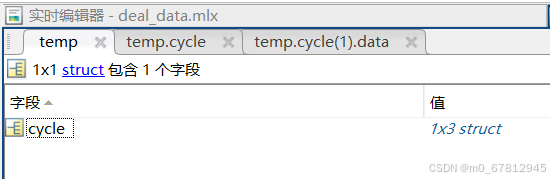
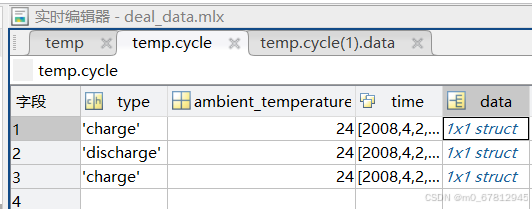
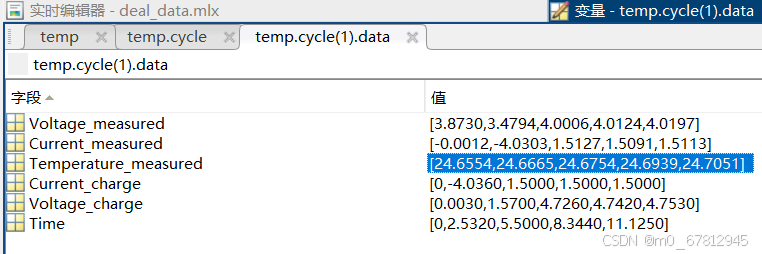
1.读取数据集代码:
  data = scipy.io.loadmat(file)
    filename = file.split(".")[0].split("/")[2]  # B0005
    # print(filename)
    col = data[filename]
    col = col[0][0][0][0]
    size = col.shape[0]

    data = []
    for i in range(size):
        k = list(col[i][3][0].dtype.fields.keys())
        d1, d2 = {}, {}
        if str(col[i][0][0]) != 'impedance':
            for j in range(len(k)):
                t = col[i][3][0][0][j][0]
                l = [t[m] for m in range(len(t))]
                d2[k[j]] = l
        d1['type'], d1['temp'], d1['time'], d1['data'] = str(col[i][0][0]), int(col[i][1][0]), str(
            convert_to_time(col[i][2][0])), d2
        data.append(d1)

    return data
但是由于里面这么多结构 很多 [0] [0]啥的看不懂,因此对探索一下数据读进来是啥规律
 	data = scipy.io.loadmat(file)
    filename = file.split(".")[0].split("/")[2]  # B0005
    '''
    python中读取mat数据说明,总共可以分为三层结构,其中第一层为ndarray,第二层也为ndarray,第三层是数据层np.void 类似于dict,可以通过下标或者字段名来实现访问
    然后使用下标访问的时候,获取的数据类型一般也是一个ndarray数组,因此想要获取里面的值可以通过下标的方式获取 这个时候一般就是下表为[0]实现获取,不行的话打印type看看用啥下标
    a = data[filename]
    print(f"01 a.shape:{a.shape}\na.type:{type(a)}\n")
    01 a.shape:(1, 1)
    a.type:<class 'numpy.ndarray'>

    b = a[0]
    print(f"02 b.shape:{b.shape}\nb.type:{type(b)}\n")
    02 b.shape:(1,)
    b.type:<class 'numpy.ndarray'>

    c = a[0][0]
    print(f"03 c.shape:{c.shape}\nc.type:{type(c)}\n")
    03 c.shape:()
    c.type:<class 'numpy.void'>

    d = a[0][0][0]
    print(f"04 d.shape:{d.shape}\nd.type:{type(d)}\n")
    04 d.shape:(1, 3)
    d.type:<class 'numpy.ndarray'>

    e = a[0][0]['cycle']
    print(f"05 e.shape:{e.shape}\ne.type:{type(e)}\n")
    05 e.shape:(1, 3)
    e.type:<class 'numpy.ndarray'>
    上述几个操作证明了struct结构读取进来的时候为三层结构
    '''
    '''
    下面证明访问void结构的时候 里面数据也为ndarray结构
    '''
    col = data[filename]
    col = col[0][0][0][0]
    size = col.shape[0]
    tmp = data[filename][0][0]['cycle'][0][0]

    is_print = True
    if is_print:
        print(f"size:{size}\ntmp.shape:{tmp.shape}tmp.len:{len(tmp)}")  # size:3  tmp.shape:() tmp.len:4
        # 检查两者是否相同
        print(np.array_equal(col, tmp))  # False
        print(type(col), type(tmp))  # <class 'numpy.ndarray'> <class 'numpy.void'>
        print(col.shape, tmp.shape)  # (3,) ()
        print(col[0]['type'])
        print(tmp[0])
    data = []

    for i in range(size):
        k = list(col[i][3][0].dtype.fields.keys())
        # ['Voltage_measured', 'Current_measured', 'Temperature_measured', 'Current_charge', 'Voltage_charge', 'Time']
        d1, d2 = {}, {}
        # temp = col[i]  type <class 'numpy.void'>
        # a = col[i][0]  # <class 'numpy.ndarray'>  #['charge']
        # b = col[i][0][0]  # <class 'numpy.str_'>  # charge
        # tmp = col[i]['type'][0]  # charge
        # 在这个地方a、b 的时候可以看到里层结构就是ndarray结构的
        if str(col[i]['type'][0]) != 'impedance':
            for j in range(len(k)):
                # print(f"03 type:{type(col[i][3][0][0][j])}\nvalue:{col[i][3][0][0][j]}")
                # <class 'numpy.ndarray'>  [[3.87301722 3.47939356 4.00058782 4.01239519 4.01970806]]
                t = col[i][3][0][0][j][0]
                # print(f"04 value:{t}\ntype:{type(t)}\n")
                # [3.87301722 3.47939356 4.00058782 4.01239519 4.01970806] <class 'numpy.ndarray'>
                d2[k[j]] = t.tolist()
        d1['type'], d1['temp'], d1['time'], d1['data'] = str(col[i][0][0].item()), int(col[i][1][0].item()), str(
            convert_to_time(col[i][2][0])), d2
        data.append(d1)
进一步验证猜想:
	'''
	first = data[filename]
    a = data[filename][0][0]
    b = data[filename][0][0]['cycle']
    c = data[filename][0][0]['cycle'][0][0]
    d = data[filename][0][0]['cycle'][0][0]['data']
    e = data[filename][0][0]['cycle'][0][0]['data'][0][0]
    f = data[filename][0][0]['cycle'][0][0]['data'][0][0][0]
    f_tmp = data[filename][0][0]['cycle'][0][0]['data'][0][0]['Voltage_measured']
    g = data[filename][0][0]['cycle'][0][0]['data'][0][0][1]
    print(f"first:{type(first)}\n{first}") # <class 'numpy.ndarray'>    [[(array([[  (array(['charge'], dtype='<U6')) ]]) )]]
    print(f"a:{type(a)}\n{a}") # <class 'numpy.void'>  (array([[ (array(['charge'], dtype='<U6')) ]]) )
    print(f"b:{type(b)}\n{b}") # <class 'numpy.ndarray'>  [[( (array(['charge'], dtype='<U6')) ]]
    print(f"c:{type(c)}\n{c}") # c:<class 'numpy.void'>  (array(['charge'], dtype='<U6')
    print(f"d:{type(d)}\n{d}") # d:<class 'numpy.ndarray'>  [[(array([[3.87301722, 3.47939356, 4.00058782, 4.01239519, 4.01970806]]) ]]
    print(f"e:{type(e)}\n{e}") # e:<class 'numpy.void'>  (array([[3.87301722, 3.47939356, 4.00058782, 4.01239519, 4.01970806]]) )
    print(f"f:{type(f)}\n{f}") # <class 'numpy.ndarray'> [[3.87301722 3.47939356 4.00058782 4.01239519 4.01970806]]
    print(f"f_tmp:{type(f_tmp)}\n{f_tmp}") # <class 'numpy.ndarray'> [[3.87301722 3.47939356 4.00058782 4.01239519 4.01970806]]
    print(f"g:{type(g)}\n{g}") # <class 'numpy.ndarray'> [[-1.20066070e-03 -4.03026848e+00  1.51273065e+00  1.50906328e+00,1.51131819e+00]]
	'''
总结
使用scipy.io 读取mat文件的时候,使用 [0] [0] 可以实现读取到类似于dict结构的numpy.void结构。 使用完2层[0] [0] 之后就得到了对应的数据,此时可以通过下标[0]、[1] 或者字段名的方式获取数据 此时获得的数据集类型为ndarray结构,如果获取类型数据看看里面到底有多少层[[]] 在使用代码
例如使用  data[filename][0][0]['cycle'][0][0]['data'][0][0]

01.第一个组合得到cycle这一个大表格的数据,如果里面还有其他字段也可以直接使用下标或者字段名读取,例如data[filename][0][0]['cycle'] / data[filename][0][0][0]  / data[filename][0][0]['XXX'] XXX 表示其他字段值

02.第二个[0][0] 实现读取第二个表格里面的数据大小

03.第三个[0][0] 实现读取第三张图里面的所有数据值

2万人民币佣金等你来拿,中德社区发起者X.Lab,联合德国优秀企业对接开发项目,领取项目得佣金!!!
更多推荐



 4
4 0
0- 0


 已为社区贡献1条内容

所有评论(0)